ড্যাশবোর্ড ও রিপোর্টস
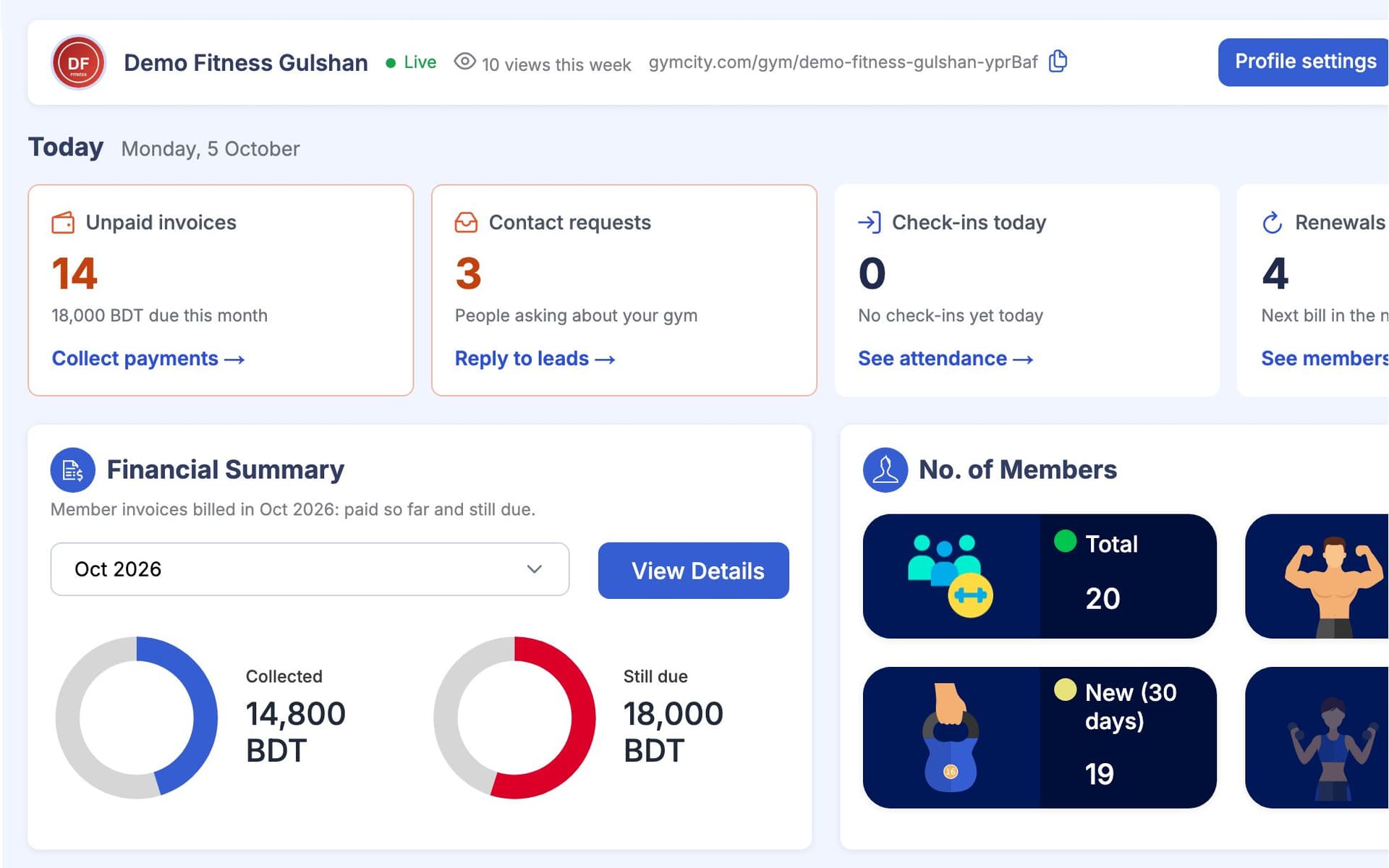
GymCity ড্যাশবোর্ড ও রিপোর্টস হলো জিম মালিক, স্টাফ বা পার্সোনাল ট্রেইনার লগইন করার পর প্রথম স্ক্রিন। এখানে আজকের ব্যবসার অবস্থা দেখা যায়, কোনো রিপোর্ট বানাতে হয় না।
GymCity ড্যাশবোর্ড ও রিপোর্টস কী?
GymCity ড্যাশবোর্ড ও রিপোর্টস-এ এক স্ক্রিনেই ফাইন্যান্সিয়াল সামারি, পেমেন্ট রিসিভড, মেম্বার বা ক্লায়েন্ট সামারি, আজকের শিডিউল আর Needs Attention লিস্ট থাকে। জিমের জন্য আছে সাপ্তাহিক অ্যাটেনডেন্স চার্ট। মালিক আর ট্রেইনাররা নতুন রিকোয়েস্ট আর প্রোফাইল ভিউ দেখতে পারেন, আর বিলিং রিপোর্টে ট্রানজেকশন, ডেইলি ক্যাশ ক্লোজ আর CSV এক্সপোর্ট পাওয়া যায়।
কেন জিম ও ট্রেইনাররা ড্যাশবোর্ড ও রিপোর্টস ব্যবহার করেন
মাস শেষে চমক
আমি মাসের হিসাব পাই শুধু শেষ দিনে রিসিপ্ট বই যোগ করলে।
প্রতি মাসে আদায় ও বাকি, সবসময় আপডেটেড।ফলো-আপ মিস
রিনিউ চলে যায় আর নিয়মিতরা হারিয়ে যায়, কেউ ফোন করার আগেই।
Needs Attention-এ দেখায় কার রিনিউ শিগগিরই দরকার আর কোন মেম্বার আসা বন্ধ করেছে।অপঠিত রিকোয়েস্ট
লোকজন আমাদের পেজে জয়েন করার জন্য জানতে চায়, আর কেউ দিন দিন রিপ্লাই দেয় না।
নতুন রিকোয়েস্ট ড্যাশবোর্ডে দেখায়, যাতে কেউ দেখে।3 ধাপ-এ ড্যাশবোর্ড ও রিপোর্টস
টাকার হিসাব দেখুন
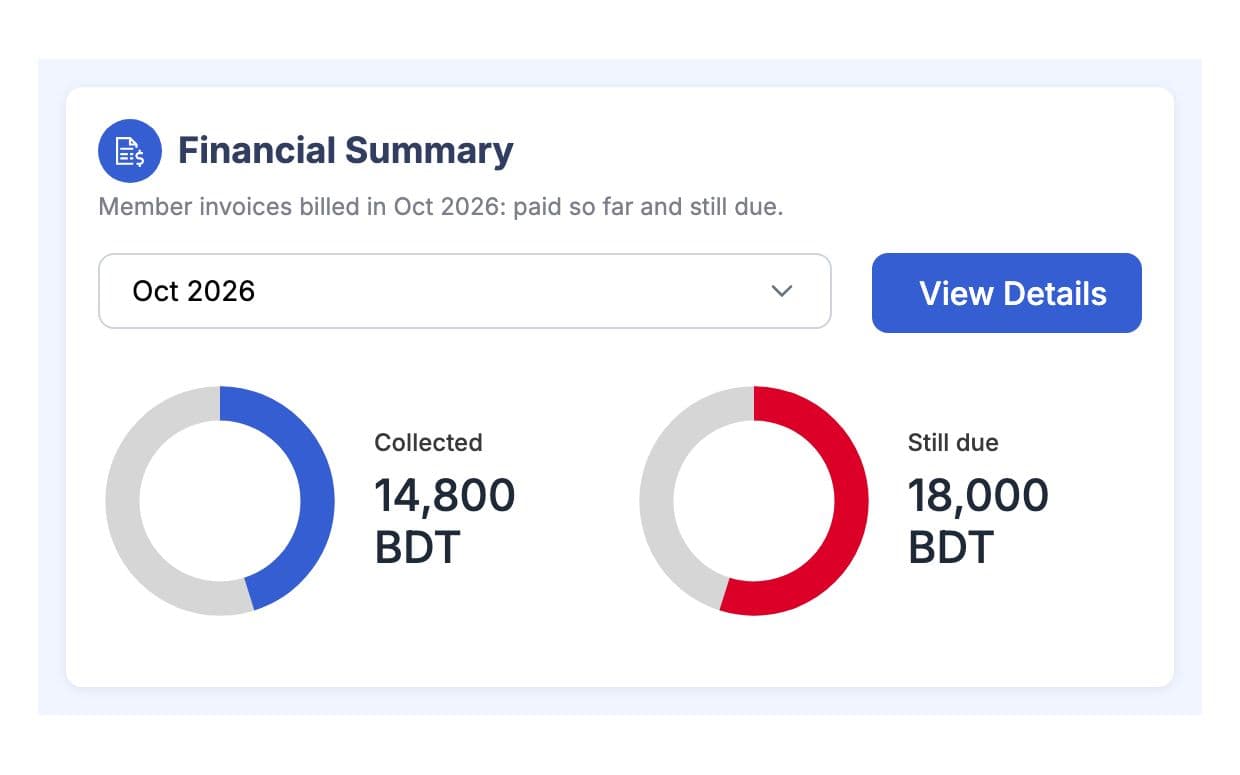
ফাইন্যান্সিয়াল সামারিতে মাসে মাসে কত টাকা আদায় হয়েছে আর কত বাকি আছে, সেটা দেখা যায়। Payments Received-এ এই মাসে কত টাকা এসেছে, সেটা দেখায়। দিন আর মাস আপনার টাইম জোন অনুযায়ী চলে, তাই "আজ" মানে আপনার দেয়াল ঘড়ির আজ। স্টাফ শুধু তখনই টাকা দেখতে পারে, যখন তাদের রোলে অনুমতি আছে।
আপনার মেম্বার দেখুন
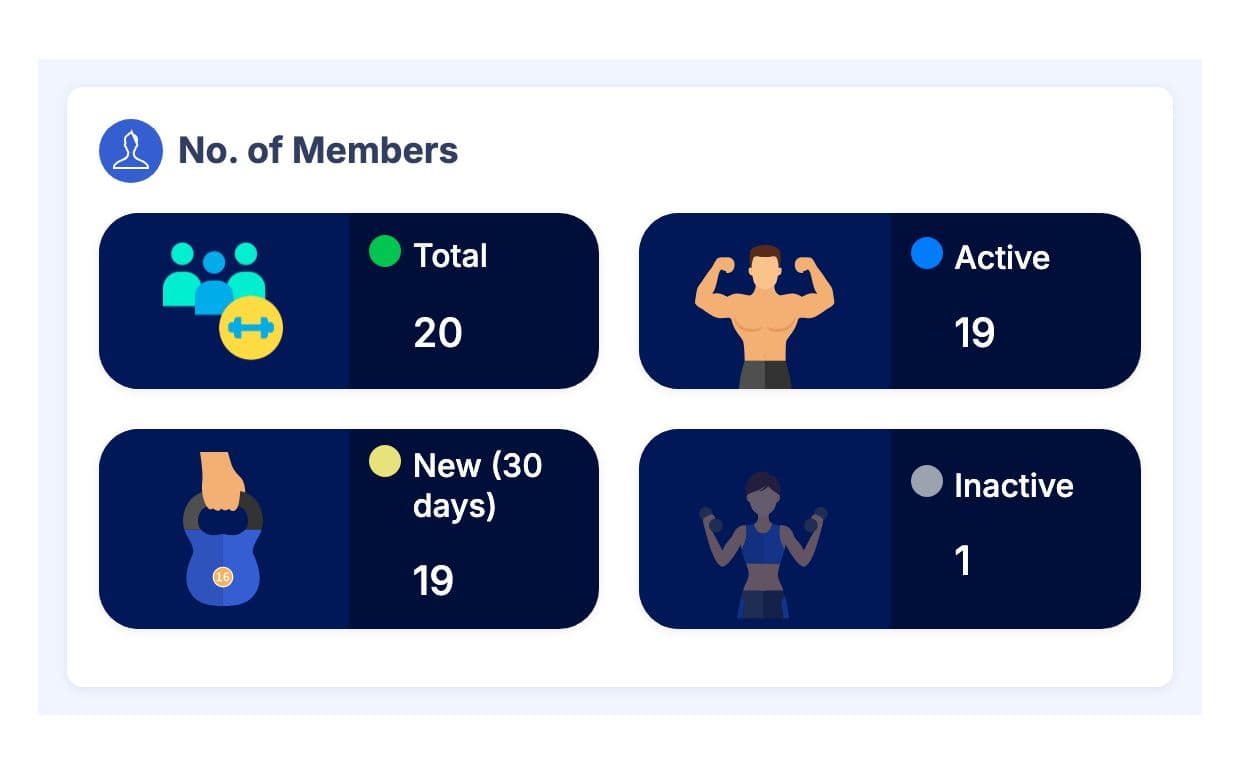
মেম্বার সামারিতে অ্যাকটিভ, নতুন আর ইনঅ্যাকটিভ মেম্বার (বা ট্রেইনারের জন্য ক্লায়েন্ট) সংখ্যা দেখায়। Needs Attention-এ দেখায় কার রিনিউ শিগগিরই দরকার আর, জিমের জন্য, কোন অ্যাকটিভ মেম্বার কয়েক সপ্তাহ আসেনি। জিমে এই সপ্তাহ আর গত সপ্তাহের ভিজিট অ্যাটেনডেন্স চার্টে দেখায়।
আজকের প্ল্যান করুন
আজকের লিস্টে ক্লাস, সেশন আর কোন মেম্বার কিছু চাইছে, সেটা দেখায়। নতুন কন্টাক্ট আর সার্ভিস রিকোয়েস্ট আসলে কেউ যেন রিপ্লাই দেয়, আর প্রোফাইল ব্যাজে এই সপ্তাহে কতজন আপনার পাবলিক পেজ দেখেছে, সেটা দেখায়। বিস্তারিত জানতে Billing খুলে ট্রানজেকশন, ডেইলি ক্যাশ ক্লোজ আর CSV এক্সপোর্ট দেখুন।
আপনার কাজের ধরন মাথায় রেখে তৈরি
একই স্ক্রিনে টাকা, মেম্বার, শিডিউল আর অ্যালার্ট, কোনো রিপোর্ট খুলতে হয় না।
এই সপ্তাহের ভিজিট, গত সপ্তাহের সাথে তুলনা করে।
হেডারে এক ব্রাঞ্চ বাছুন, বা সব ব্রাঞ্চ একসাথে দেখুন।
ড্যাশবোর্ড ও রিপোর্টস-এ যা পাচ্ছেন
ড্যাশবোর্ড ও রিপোর্টস: সচরাচর প্রশ্ন
জিম মালিক ও ট্রেইনাররা সবচেয়ে বেশি যা জিজ্ঞেস করেন, তার সংক্ষিপ্ত উত্তর।
সব প্রশ্ন →ফাইন্যান্সিয়াল সামারি, এই মাসে পাওয়া পেমেন্ট, মেম্বার বা ক্লায়েন্টের সংক্ষিপ্ত তথ্য, আজকের শিডিউল, Needs Attention অ্যালার্ট, নতুন কন্টাক্ট ও সার্ভিস রিকোয়েস্ট, আর এই সপ্তাহের প্রোফাইল ভিউ। জিমগুলো অ্যাটেনডেন্স চার্টও দেখতে পাবে। আপনি যদি SMS বা WhatsApp রিমাইন্ডার পাঠান, তাহলে ইউজেজ মিটার দেখাবে এই মাসের বরাদ্দের কতটুকু বাকি আছে।
হ্যাঁ। হেডারে একটা ব্রাঞ্চ সিলেক্ট করলে ড্যাশবোর্ড, লিস্ট আর রিপোর্ট সব ওই ব্রাঞ্চ অনুযায়ী দেখাবে। মালিকরা চাইলে সব ব্রাঞ্চে আবার ফিরে যেতে পারেন। যারা শুধু একটা ব্রাঞ্চে কাজ করেন, তারা শুধু ওই ব্রাঞ্চই দেখতে পাবেন, যেমন রিসেপশনিস্টের ড্যাশবোর্ডে শুধু তাদের মেম্বার আর ভিজিট দেখা যাবে।
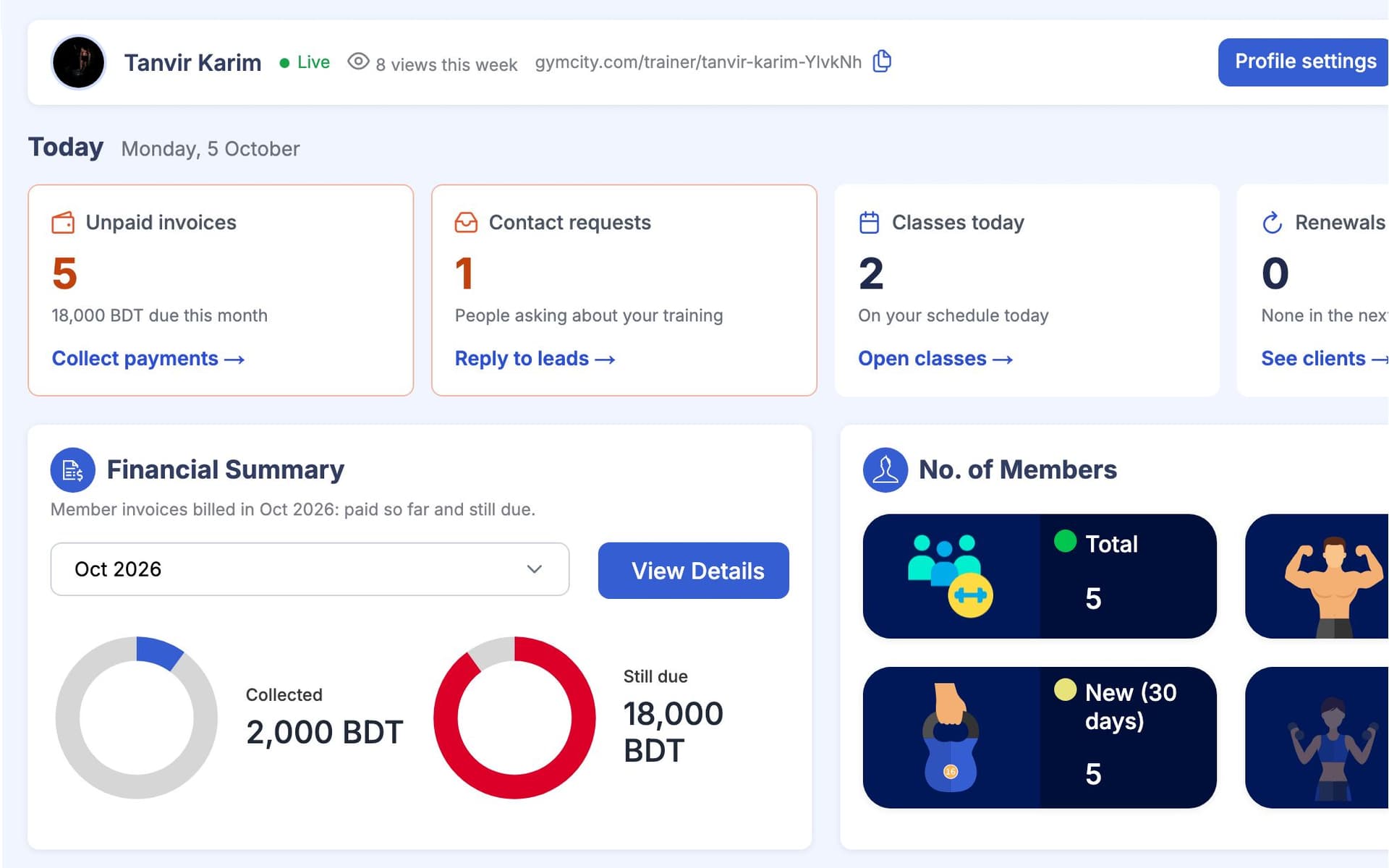
হ্যাঁ। ট্রেইনারদের ড্যাশবোর্ডে পাওয়া পেমেন্ট, ক্লায়েন্টদের বাকি থাকা টাকা, ক্লায়েন্ট সামারি, আজকের ক্লাস ও সেশন, আসন্ন রিনিউয়াল, নতুন রিকোয়েস্ট আর তাদের পাবলিক প্রোফাইলের ভিউ দেখা যায়। এখানে কোনো এটেনডেন্স চার্ট নেই, কারণ ট্রেইনারের ক্লায়েন্টরা দরজায় চেক-ইন করেন না।
আপনি আপনার অ্যাকাউন্টেন্টের জন্য বিলিং ট্রানজেকশনগুলো CSV ফাইল হিসেবে এক্সপোর্ট করতে পারবেন, আর Messages Sent রিপোর্টেরও আলাদা CSV আছে। GymCity-তে কাস্টম রিপোর্ট বিল্ডার নেই, তাই অন্য যেসব তথ্য দরকার, সেগুলো ড্যাশবোর্ড কার্ড বা লিস্ট থেকে দেখে নিতে হবে।
শুধু তখনই, যখন তাদের রোলে এটা অনুমতি দেওয়া আছে। টাকা সংক্রান্ত কার্ড আর মেম্বার সংখ্যা দেখার জন্য স্টাফ পারমিশন লাগে, যেটা মালিক প্রতিটা রোলের জন্য ঠিক করে দেন। আপনার জিমের কোনো ট্রেইনার বা ফাইন্যান্স অ্যাক্সেস ছাড়া কোনো রিসেপশনিস্ট শুধু তাদের কাজের জন্য দরকারি ড্যাশবোর্ডের অংশ, যেমন আজকের শিডিউল আর অ্যালার্ট, দেখতে পাবে।
একসাথে আরও ভালো কাজ করে
সর্বশেষ আপডেট 16 অক্টোবর, 2026লিখেছেন Sarwar Hossainস্ক্রিনে শুধু ডেমো তথ্য দেখানো হয়েছে
আপনার জিম বা ক্লায়েন্টদের সাথে ড্যাশবোর্ড ও রিপোর্টস ট্রাই করুন
আজই ফ্রিতে আপনার জিম বা ট্রেনিং ব্যবসা লিস্ট করুন, আর প্রস্তুত হলে প্রয়োজনীয় টুলগুলো চালু করুন।