আপনার পেজ থেকে জয়েন, ফ্রি ট্রায়াল ও ক্লাস রিকোয়েস্ট
অনলাইনে কেউ জিম বা ট্রেইনার খুঁজলে বেশিরভাগই আগে কিছু জানতে চায়। রিকোয়েস্ট ফর্মে কয়েকটা ট্যাপেই তারা জানতে পারে, আর প্রতিটা রিকোয়েস্টে নাম ও ফোন নাম্বারসহ আপনার কাছে পৌঁছে যায়।
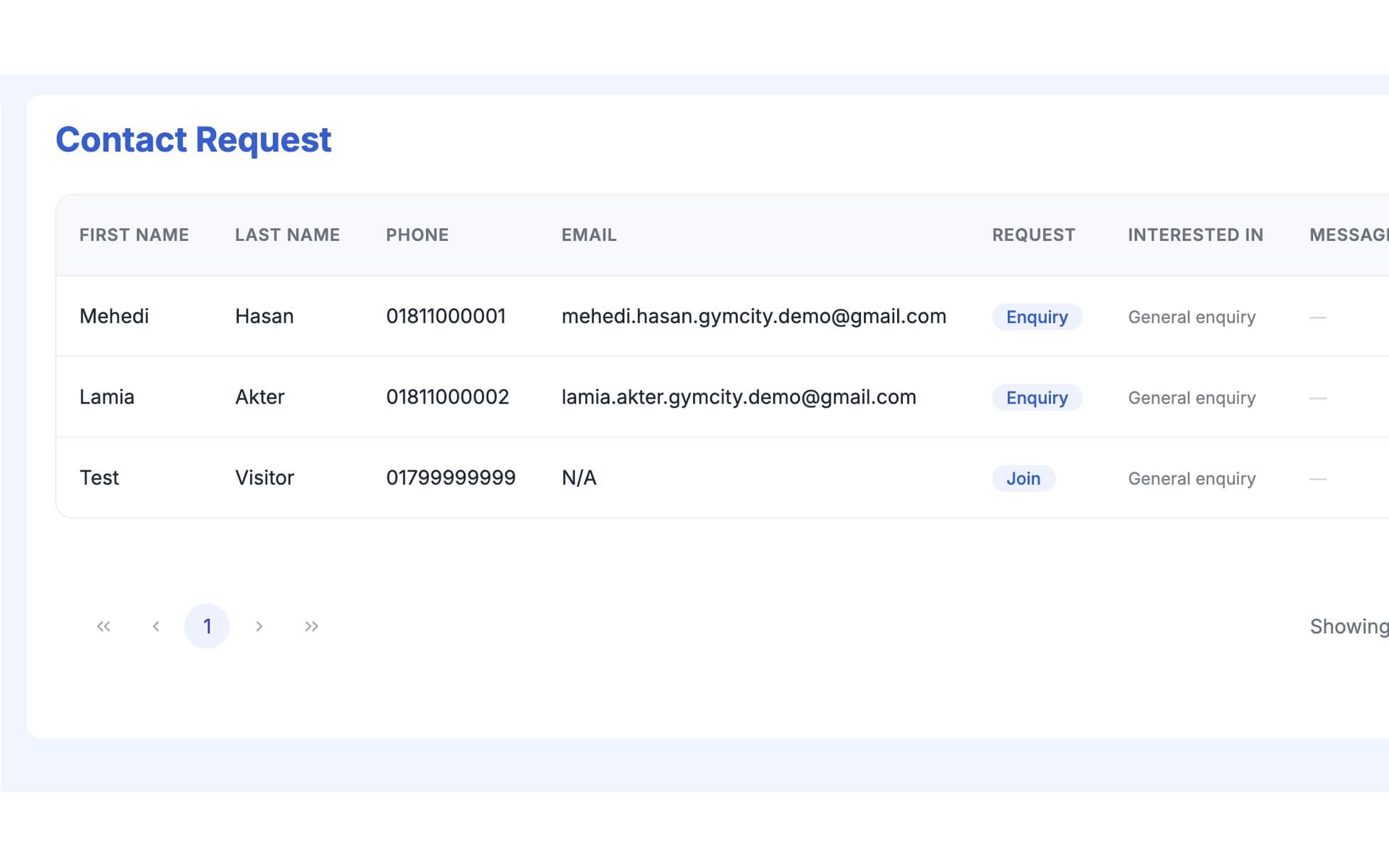
GymCity মেম্বার রিকোয়েস্ট কী?
মেম্বার রিকোয়েস্ট হলো GymCity-র পাবলিক পেজের ফর্ম, যেখানে ভিজিটররা জয়েন, ফ্রি ট্রায়াল, ক্লাসে যোগ দেয়া বা প্রশ্ন করতে পারে। তারা নাম ও ফোন নাম্বার দেয়, আর রিকোয়েস্টটা GymCity-তে আপনার লিডস লিস্টে চলে আসে, যাতে আপনি আগ্রহ থাকতেই কল করতে পারেন।
কেন জিম ও ট্রেইনাররা মেম্বার রিকোয়েস্ট ব্যবহার করেন
উত্তরহীন ইনকোয়ারি
প্রশ্নগুলো ফেসবুক, WhatsApp, Instagram আর ফ্রন্ট ডেস্কে আসে, অনেকগুলোর উত্তরই দেয়া হয় না। প্রতিটা মিসড রিকোয়েস্ট মানে কেউ অন্য কোথাও মেম্বার হয়েছে।
আপনার পেজের সব রিকোয়েস্ট এক লিস্টে জমা হয়।কোনো কন্টাক্ট ডিটেইল নেই
একটা পোস্টের নিচে 'price?' কমেন্ট করলে পরে আর কিছুই করার থাকে না।
প্রতিটা রিকোয়েস্টে সঠিক ফরম্যাটে ফোন নাম্বার থাকে।কি চায় বুঝতে পারছেন না
আপনি কল ব্যাক করেন, কিন্তু তারা ট্রায়াল, ক্লাস নাকি শুধু ফি জানতে চায় বুঝতে পারেন না।
প্রতিটা রিকোয়েস্টে টাইপ আর কোন প্ল্যান বা ক্লাস চেয়েছে সেটা দেখা যায়।3 ধাপ-এ মেম্বার রিকোয়েস্ট
ভিজিটর রিকোয়েস্ট পাঠায়
আপনার পাবলিক পেজে ভিজিটররা Request to Join, কোনো প্ল্যানের Join বাটন বা ক্লাসে ট্যাপ করে। ফর্মে জানতে চায়: জয়েন করতে, ফ্রি ট্রায়াল (আপনি দিলে), নির্দিষ্ট প্ল্যান বা ক্লাস, কোচিং বা প্রশ্ন। তারা নাম ও ফোন নাম্বার দেয়, চাইলে ইমেইল ও ছোট মেসেজও দিতে পারে। GymCity অ্যাকাউন্ট লাগে না, আর সহজ একটা চেক বেশিরভাগ স্প্যাম আটকায়।
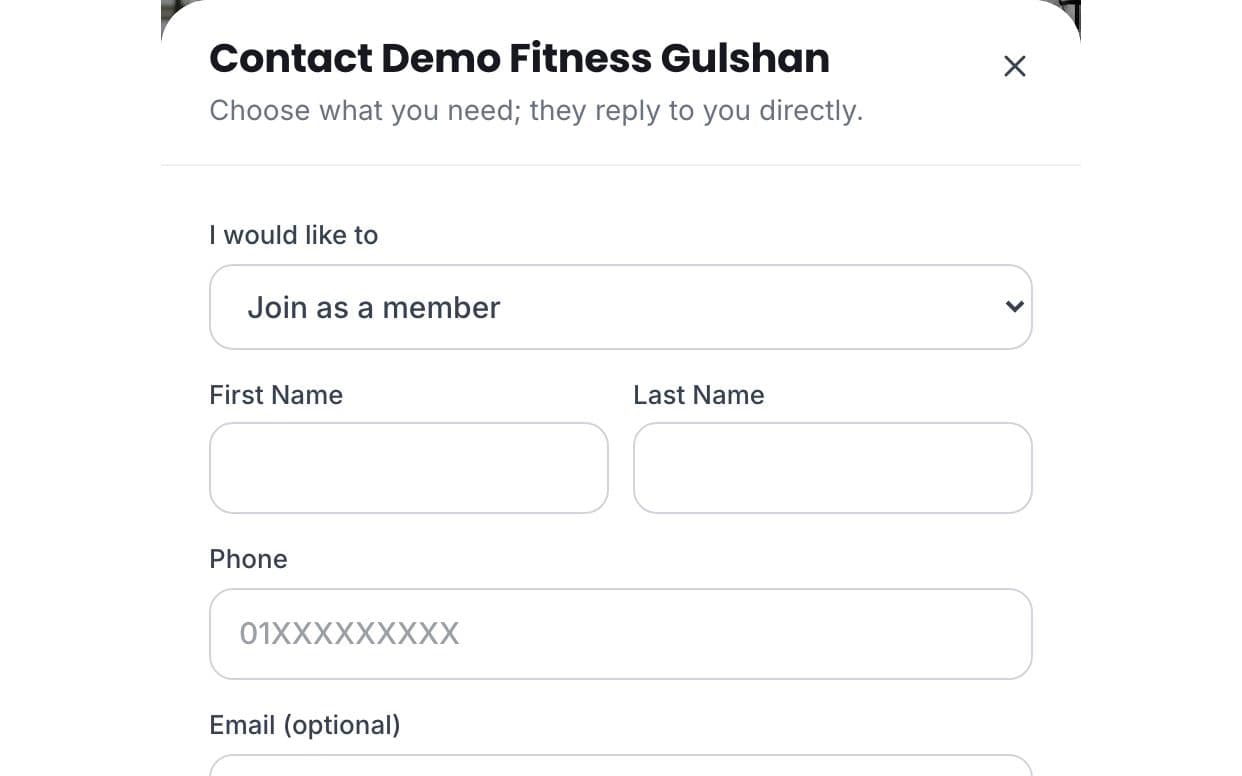
GymCity-তে দেখতে পাবেন
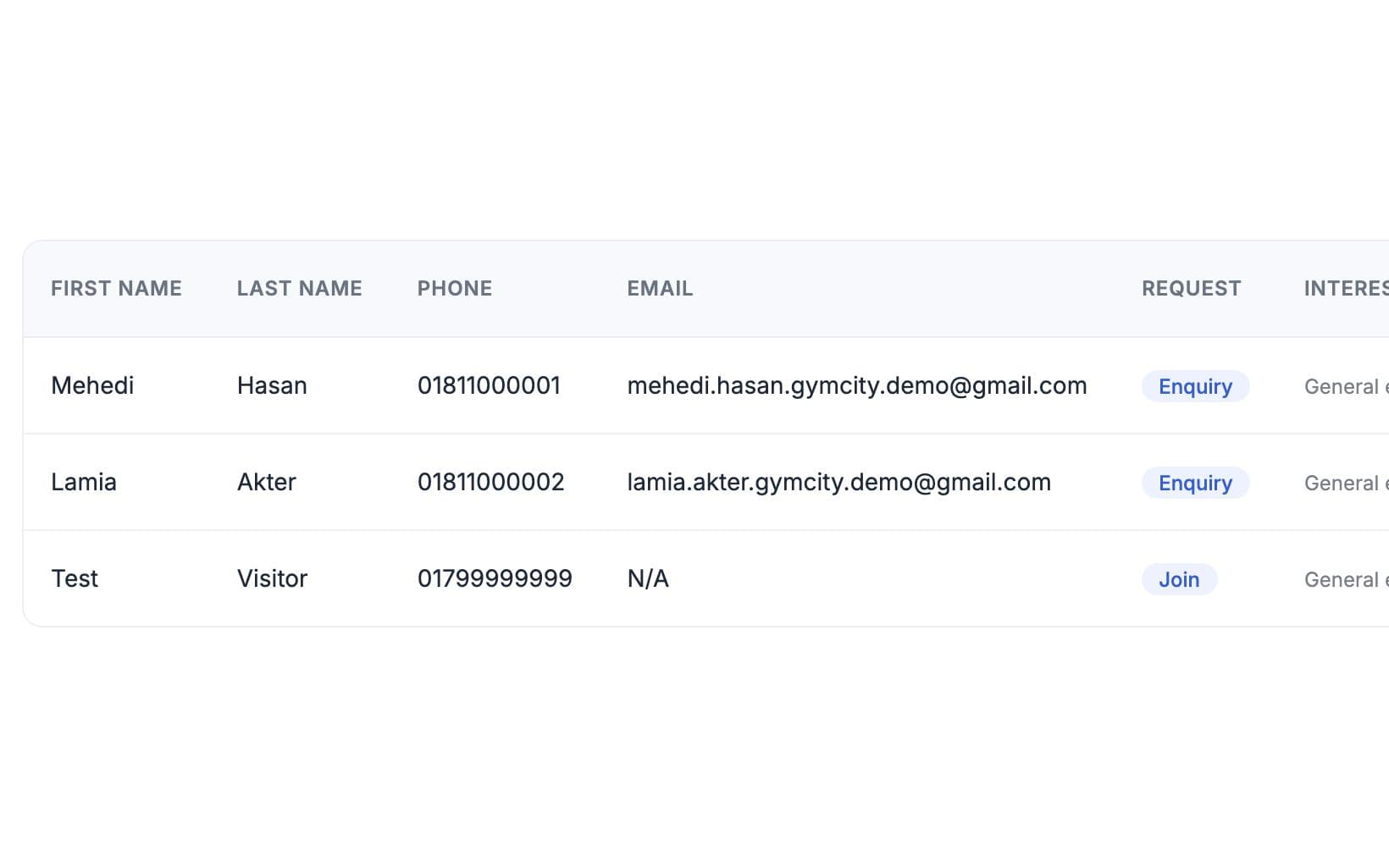
রিকোয়েস্টটা Leads-এ Inbox মেনুতে আর ড্যাশবোর্ডের রিকোয়েস্ট কার্ডে দেখা যায়। প্রতিটা রো-তে নাম, ফোন, ইমেইল, রিকোয়েস্ট টাইপ, কোন প্ল্যান বা ক্লাস চেয়েছে, মেসেজ আর তারিখ দেখা যায়। আপনার প্ল্যানে রিকোয়েস্ট ইমেইল থাকলে, নতুন রিকোয়েস্ট এলেই GymCity আপনাকে ইমেইলও পাঠাবে।
ফলো আপ ও অ্যাড করুন
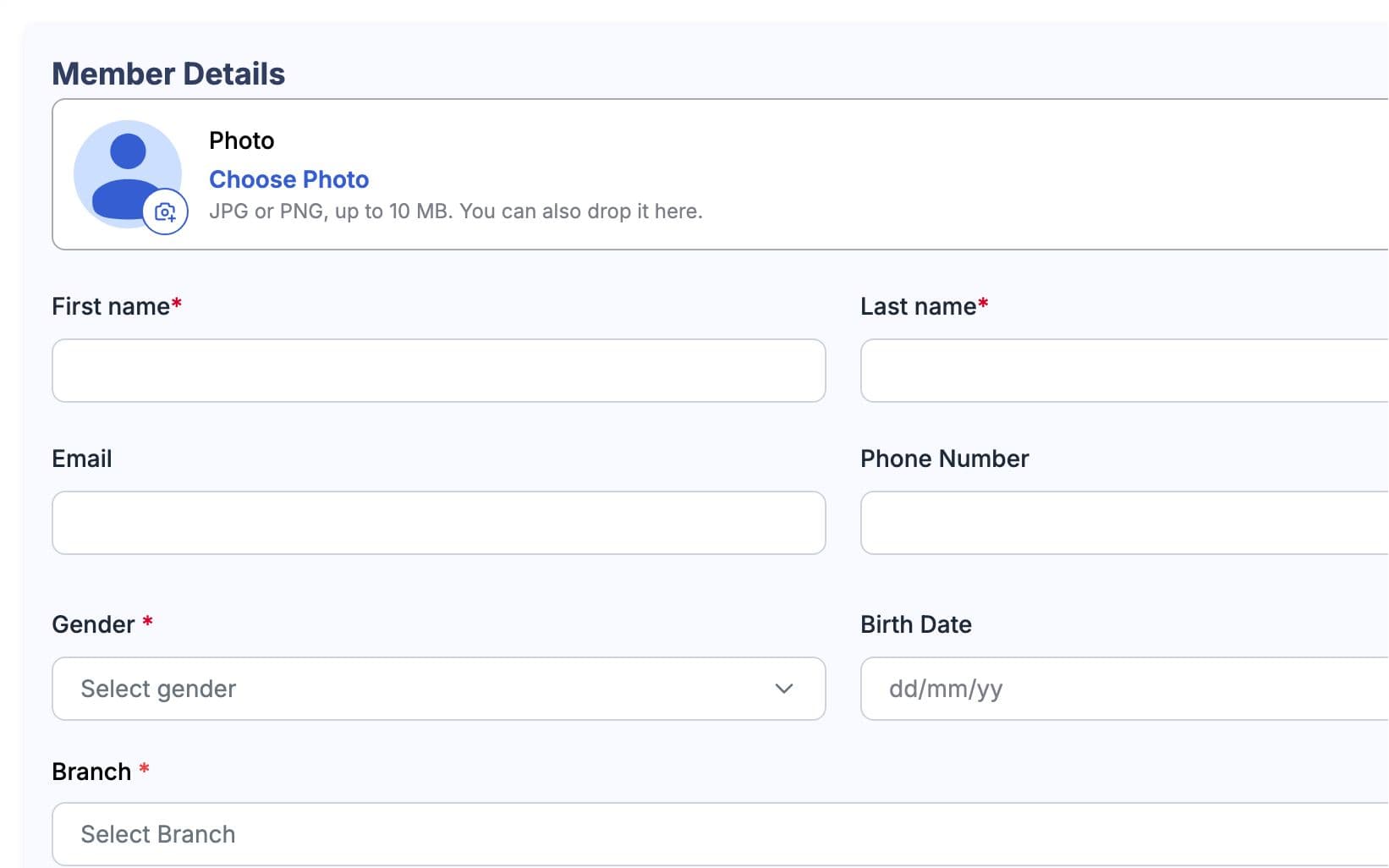
লিস্ট থেকে এক ট্যাপে কল বা ইমেইল করুন, তাদের প্রশ্নের উত্তর দিন আর স্টার্ট ডেট বা ট্রায়াল টাইম ঠিক করুন। তারা জয়েন করলে, মেম্বারসে ফোন নাম্বারসহ অ্যাড করুন আর তাদের প্ল্যান সিলেক্ট করুন। GymCity তখন তাদের নিজস্ব অ্যাকাউন্ট লিংক করার ইনভাইট পাঠাবে। একবার লিংক হলে, তারা তাদের প্ল্যান, বিল আর ওয়ার্কআউট দেখতে পাবে।
আপনার কাজের ধরন মাথায় রেখে তৈরি
জয়েন, ফ্রি ট্রায়াল, ক্লাস বা প্রশ্ন—তাই জানেন তারা কেন কল করছে।
মেইন পেজ আর ব্রাঞ্চ পেজের সব রিকোয়েস্ট এক জায়গায়।
রিকোয়েস্টে দেখা যায় ভিজিটর কোন প্ল্যান বা ক্লাস বেছে নিয়েছে।
মেম্বার রিকোয়েস্ট-এ যা পাচ্ছেন
মেম্বার রিকোয়েস্ট: সচরাচর প্রশ্ন
জিম মালিক ও ট্রেইনাররা সবচেয়ে বেশি যা জিজ্ঞেস করেন, তার সংক্ষিপ্ত উত্তর।
সব প্রশ্ন →চারটা জিনিস: জয়েন করা, ফ্রি ট্রায়াল, কোনো ক্লাস, অথবা কোনো প্রশ্নের উত্তর। জিম ভিজিটররা জয়েন করার সময় আপনার প্ল্যানগুলোর যেকোনো একটা বেছে নিতে পারে, আর ট্রেইনার ভিজিটররা কোচিং শুরু করতে চাইতে পারে। আপনি যদি ফ্রি ট্রায়াল দেন, তাহলে সেটাই দেখাবে; না হলে জিম ভিজিটররা আগে ভিজিট করার অনুরোধ করতে পারবে।
না। একটা রিকোয়েস্ট মানে শুধু আপনাকে একটা মেসেজ পাঠানো, এটা কোনো বুকিং না, আর কেউ রিকোয়েস্ট পাঠালে কোনো টাকা লেনদেন হয় না। আপনি তাদের কল বা ইমেইল করে দিন-তারিখ ঠিক করবেন, তারপর নিজেই তাদের মেম্বার বা ক্লাসে যোগ করবেন। এতে আপনি কেপাসিটি আর ফি কন্ট্রোল করতে পারবেন।
আপনার GymCity অ্যাকাউন্টে, Inbox-এ তারপর Leads-এ, আর ড্যাশবোর্ডের রিকোয়েস্ট কার্ডে নতুন রিকোয়েস্ট দেখতে পাবেন। প্রতিটা রিকোয়েস্টে নাম, ফোন নম্বর, রিকোয়েস্টের ধরন, বাছাই করা প্ল্যান বা ক্লাস আর মেসেজ দেখাবে, সাথে কল বা ইমেইল করার বাটন থাকবে। আপনার প্ল্যানে রিকোয়েস্ট ইমেইল থাকলে, GymCity আপনাকে ইমেইলও পাঠাবে যখন নতুন রিকোয়েস্ট আসবে।
না। শুধু নাম আর নিজের দেশের ফরম্যাটে ফোন নম্বর দিলেই হবে; ইমেইল আর মেসেজ অপশনাল। এতে ফর্মটা ছোট থাকে, যিনি আপনাকে刚刚 খুঁজে পেয়েছেন তার জন্য সহজ হয়। পরে তারা জয়েন করলে, আপনি চাইলে তাদের GymCity অ্যাকাউন্টের সাথে লিঙ্ক করার জন্য ইনভাইট করতে পারেন, যাতে তারা নিজের প্ল্যান, বিল আর ওয়ার্কআউট দেখতে পারে।
হ্যাঁ। আপনার পাবলিক পেজ থেকে রিকোয়েস্ট পাওয়াতে কোনো খরচ নেই, আর প্রতি রিকোয়েস্টেও কোনো ফি নেই। যেকোনো প্ল্যানেই রিকোয়েস্টগুলো আপনার অ্যাকাউন্টে দেখাবে; নতুন রিকোয়েস্টের ইমেইল অ্যালার্ট GymCity প্ল্যানের ওপর নির্ভর করে। দ্রুত রিপ্লাই দিন: একই দিনে কল করলে সাধারণত এক সপ্তাহ পরে কল করার চেয়ে ভালো রেসপন্স পাওয়া যায়।
একসাথে আরও ভালো কাজ করে
সর্বশেষ আপডেট 16 অক্টোবর, 2026লিখেছেন Sarwar Hossainস্ক্রিনে শুধু ডেমো তথ্য দেখানো হয়েছে
আপনার জিম বা ক্লায়েন্টদের সাথে মেম্বার রিকোয়েস্ট ট্রাই করুন
আজই ফ্রিতে আপনার জিম বা ট্রেনিং ব্যবসা লিস্ট করুন, আর প্রস্তুত হলে প্রয়োজনীয় টুলগুলো চালু করুন।