জিম ট্রেইনার ও ট্রেইনারের সময়সূচি
ট্রেইনার ও ট্রেইনারের সময়সূচি হলো যেখানে জিম তাদের কোচদের রাখে, কে কোন মেম্বারকে দেখবে সেটা ঠিক করে আর কে ফ্লোরে থাকবে সেটা প্ল্যান করে। ওনার আর ম্যানেজাররা এটা সেটআপ করেন; ফ্রন্ট ডেস্ক স্টাফ ব্যবহার করে জানতে "আমার ট্রেইনার কে?" আর "আজ কে আছে?"
GymCity ট্রেইনার ও ট্রেইনারের সময়সূচি কী?
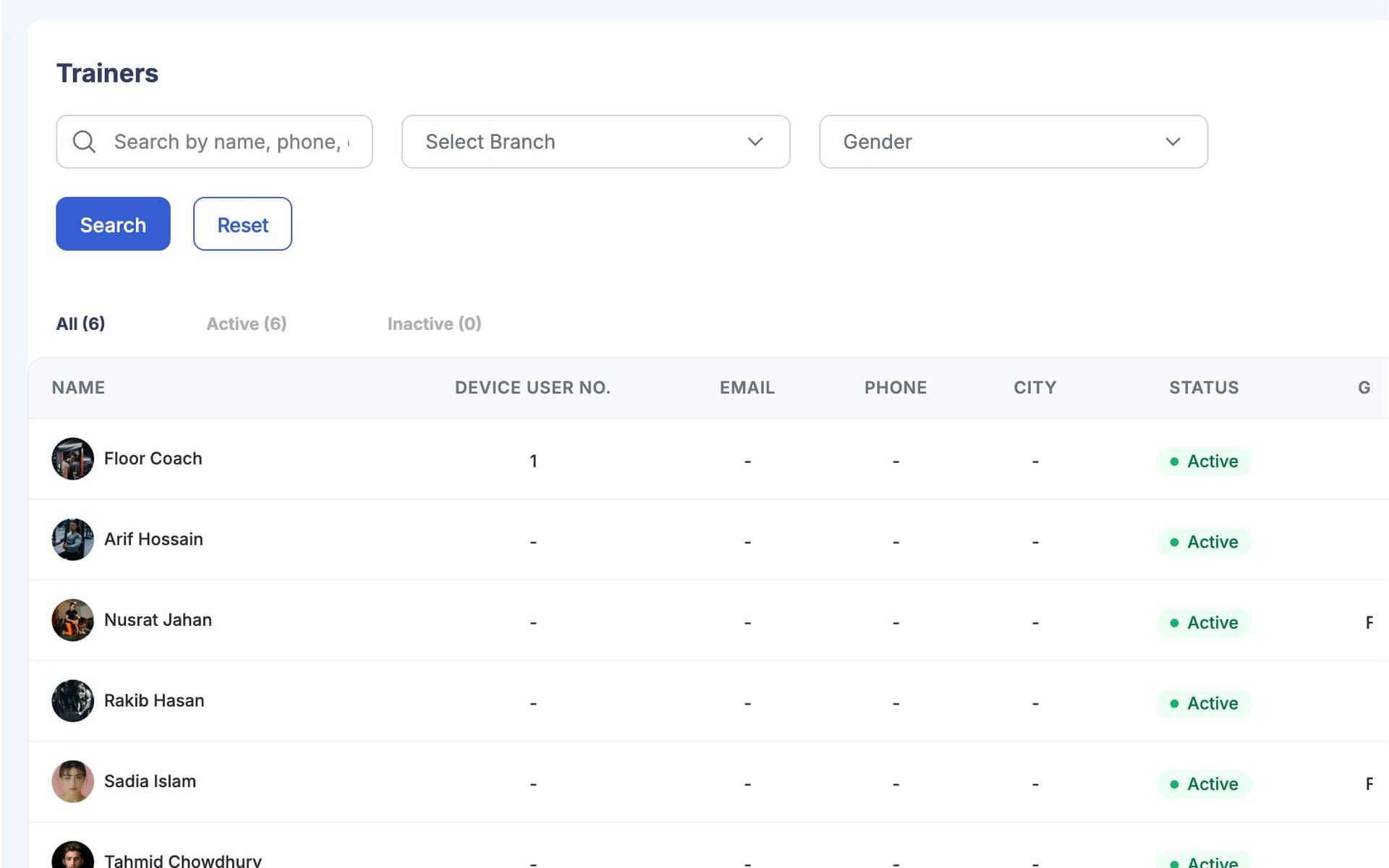
GymCity ট্রেইনার ও ট্রেইনারের সময়সূচি আপনার জিমের কোচদের লিস্ট রাখে কন্টাক্ট ডিটেইলস, ব্রাঞ্চ আর এক্সপার্টিজসহ, আর প্রতিটা মেম্বারের জন্য কোচ অ্যাসাইন করতে দেয়। প্রতি ব্রাঞ্চে সাপ্তাহিক রোস্টার দেখায় কে কখন ডিউটিতে আছে, আর আজকের সময়সূচি আপনার ড্যাশবোর্ডে দেখায়। চাইলে আপনার কোচদের পাবলিক পেজেও দেখাতে পারেন।
কেন জিমগুলো ট্রেইনার ও ট্রেইনারের সময়সূচি ব্যবহার করেন
কে কাকে কোচিং দেয়?
কোনো মেম্বার তাদের "নিজের" ট্রেইনার চায় আর ডেস্ক জানে না কে সেটা। নতুন স্টাফদের জিজ্ঞেস করতে হয়।
প্রতিটা মেম্বার প্রোফাইলে তাদের কোচ দেখায়।কাগজে রোস্টার
ডিউটি রোস্টার অফিসের দেয়ালে কাগজে টাঙানো। বদলালে, টিমের অর্ধেক এখনো পুরনোটা ফলো করে।
প্রতি ব্রাঞ্চে সাপ্তাহিক রোস্টার, GymCity-তে রাখা হয়।ফাঁকা ফ্লোর
কিছু সন্ধ্যায় দুইজন কোচ চলে আসে, আবার কিছু সকালে এক ঘণ্টা ফ্লোরে কেউ থাকে না।
আজকের কোচদের আপনার ড্যাশবোর্ডে দেখুন।3 ধাপ-এ ট্রেইনার ও ট্রেইনারের সময়সূচি
আপনার কোচ যোগ করুন
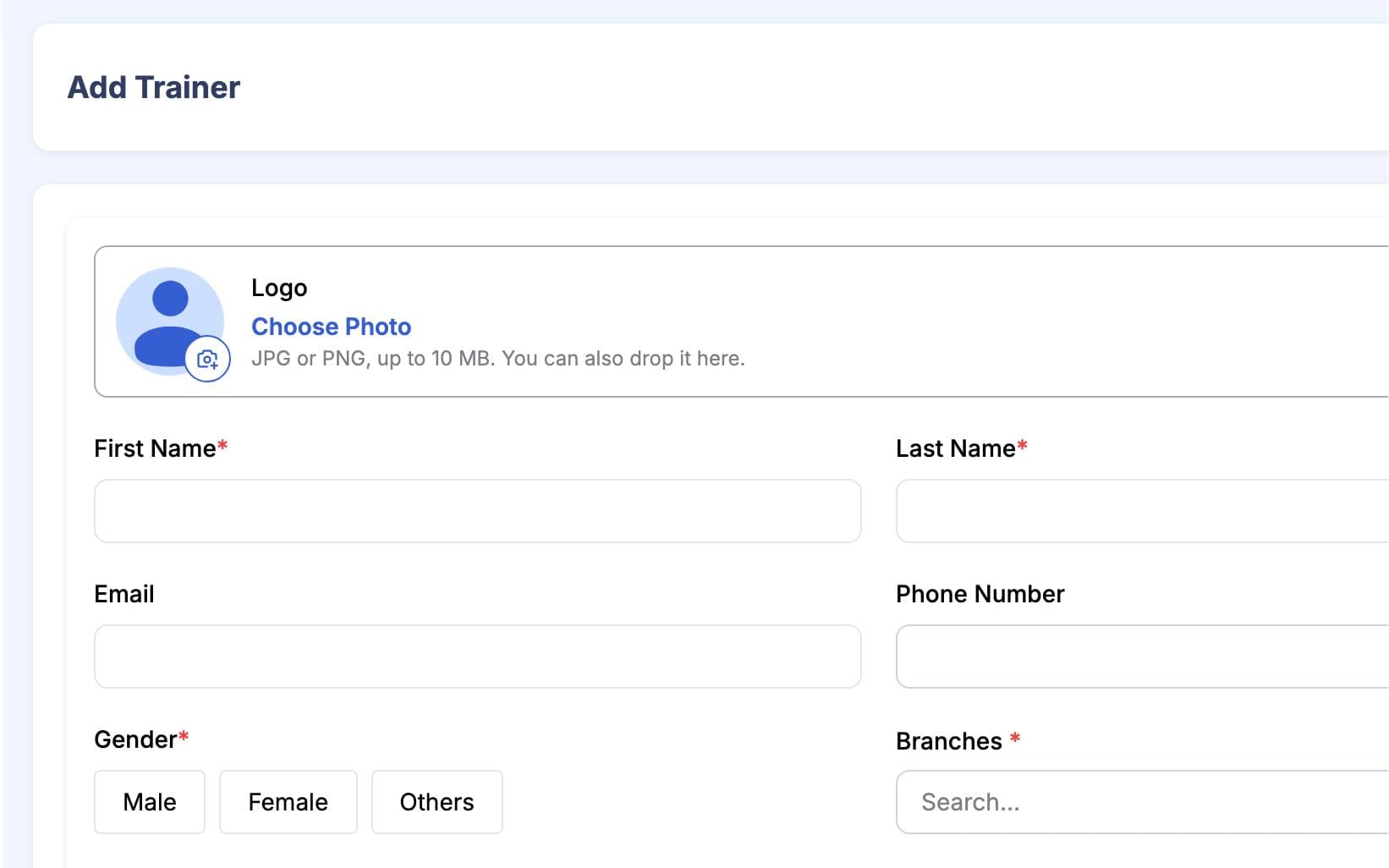
প্রতিটা কোচের কন্টাক্ট ডিটেইলস, জেন্ডার, কোন ব্রাঞ্চে কাজ করে আর কোন এক্সপার্টিজ আছে (যেমন স্ট্রেংথ ট্রেইনিং বা ওজন কমানো) যোগ করুন। লিস্টে সব কোচ এক জায়গায় দেখাবে, আপনি যে ব্রাঞ্চে আছেন সেটা দিয়ে ফিল্টার করতে পারবেন। এক্সপার্টিজ ডেস্ককে সঠিক কোচের কাছে মেম্বার পাঠাতে সাহায্য করে। চাইলে পরে ঠিক করতে পারবেন কোন কোচ পাবলিক পেজে দেখাবেন।
রোস্টার প্ল্যান করুন
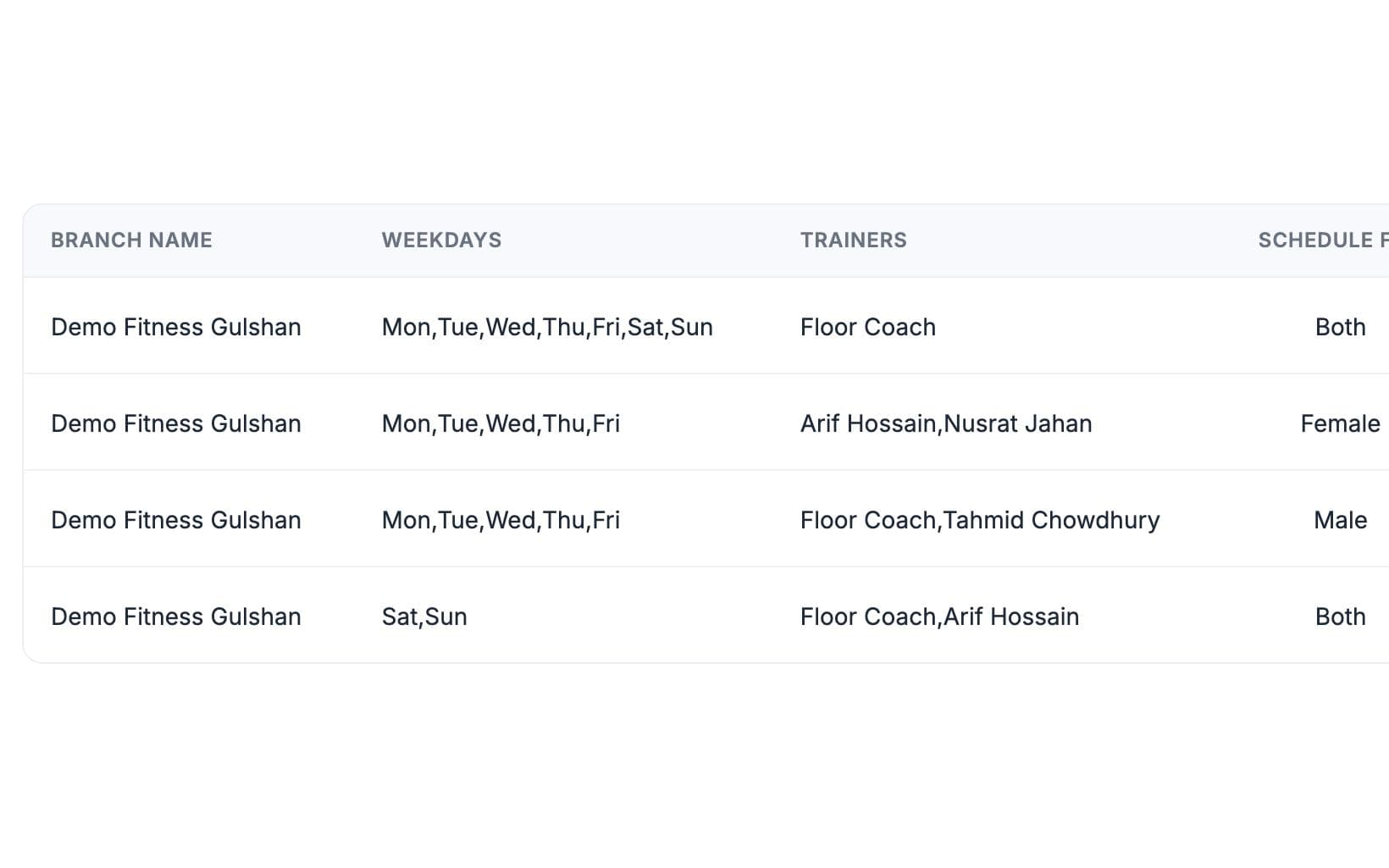
প্রতি ব্রাঞ্চে, সপ্তাহের দিন, শুরু আর শেষ সময় দিয়ে টাইম স্লট যোগ করুন, আর স্লটটা ছেলেদের, মেয়েদের নাকি দুজনের জন্য সেটা ঠিক করুন। প্রতিটা স্লটে কোন কোচ ডিউটিতে থাকবে সেটা বাছুন। রোস্টার এক নজরে পুরো সপ্তাহ দেখাবে, আর আজকের স্লটগুলো ড্যাশবোর্ডে দেখাবে। কোনো কোচের সময় বদলালে, একবার এডিট করলেই সবাই নতুন রোস্টার দেখতে পাবে।
মেম্বারদের কোচ অ্যাসাইন করুন
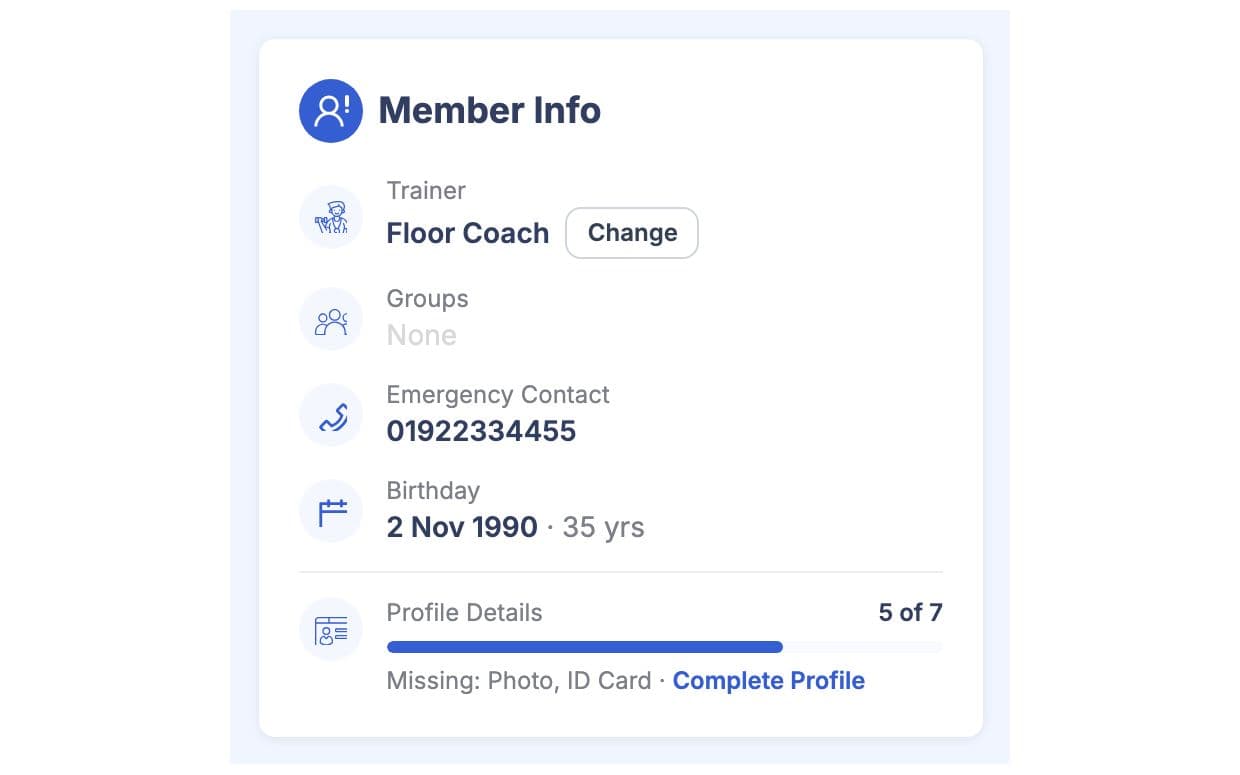
মেম্বারের প্রোফাইলে তাদের কোচ বাছুন। তখন কোচের নাম মেম্বারের স্ট্যাটাস হেডারে দেখাবে, তাই ডেস্কে যে কেউ জানবে কাকে কল করতে হবে। মেম্বার অন্য কোচে গেলে যেকোনো সময় বদলাতে পারবেন। কোনো কোচ চলে গেলে, তাদের মেম্বারদের অন্য কাউকে অ্যাসাইন করুন।
আপনার কাজের ধরন মাথায় রেখে তৈরি
সব কোচ তাদের ব্রাঞ্চ আর এক্সপার্টিজসহ, যাতে ডেস্ক মেম্বারদের সঠিক কোচের কাছে পাঠাতে পারে।
কে কোন স্লটে, কোন ব্রাঞ্চে, ছেলেদের, মেয়েদের নাকি দুজনের জন্য, ডিউটিতে আছে।
ভিজিটররা জিম কম্পেয়ার করলে আপনার কোচদের পাবলিক পেজে দেখতে পারবে, আসার আগে।
ট্রেইনার ও ট্রেইনারের সময়সূচি-এ যা পাচ্ছেন
ট্রেইনার ও ট্রেইনারের সময়সূচি: সচরাচর প্রশ্ন
জিম মালিক ও ট্রেইনাররা সবচেয়ে বেশি যা জিজ্ঞেস করেন, তার সংক্ষিপ্ত উত্তর।
সব প্রশ্ন →এই তালিকার মাধ্যমে না। এখানে কোচরা শুধু জিমের রেকর্ড ও শিডিউলের জন্য রাখা হয়; তারা স্টাফ লগইনের সাথে যুক্ত না। যদি কোনো কোচকে ড্যাশবোর্ড ব্যবহার করতে হয়, যেমন মেম্বার চেক-ইন করতে, তাহলে তাকে স্টাফ হিসেবে উপযুক্ত রোলে যোগ করুন। স্বাধীন পার্সোনাল ট্রেইনারদের নিজেদের GymCity অ্যাকাউন্ট থাকে, যেটা আলাদা প্রোডাক্ট।
না। রোটা দেখায় কোন কোচ কখন কোন ব্রাঞ্চে ডিউটিতে আছেন। ক্লাস হচ্ছে পার্সোনাল ট্রেইনাররা তাদের ক্লায়েন্টদের জন্য যেসব সেশন নেন, তাদের আলাদা ক্যালেন্ডার থাকে। জিমগুলো রোটা ব্যবহার করে স্টাফিংয়ের জন্য; এটা মেম্বারদের জন্য কোনো সাইন আপের টাইমটেবিল না।
হ্যাঁ, যদি আপনি চান তাহলে আপনার পাবলিক পেজে ট্রেইনারদের দেখাতে পারবেন। যারা জিম খুঁজছেন, তারা সাধারণত জানতে চান কে তাদের ট্রেইন করবে, তাই ট্রেইনারদের এবং তাদের দক্ষতা দেখালে উপকারে আসতে পারে। আপনি যেকোনো সময় আবার ট্রেইনারদের লুকিয়ে রাখতে পারবেন, এবং তাদের সম্পর্কে অন্য কিছুই বদলাবে না।
হ্যাঁ। কোচ যেসব ব্রাঞ্চে কাজ করেন, সবগুলো যোগ করুন, তাহলে তাকে প্রতিটি ব্রাঞ্চের রোটা স্লটে রাখা যাবে। কোনো ব্রাঞ্চের স্টাফ শুধু সেই ব্রাঞ্চের কোচদেরই দেখতে পাবে। একাধিক ব্রাঞ্চ চালানো আপনার প্ল্যানের ওপর নির্ভর করে; কোন প্ল্যানে এটা আছে, সেটা প্রাইসিং পেজে দেখানো আছে।
না। Trainers & Trainer Schedules-এ শুধু কোচের ডিটেইলস, মেম্বার অ্যাসাইনমেন্ট আর ডিউটি রোস্টার দেখা যায়। এখানে সেলারি, কমিশন বা কাজের ঘণ্টা হিসাব করা হয় না, আর কোচরা এখানে লগইনও করে না। আপাতত আপনার অ্যাকাউন্টস সিস্টেমে পে-রোল রাখুন, আর ডিউটি রোস্টার ব্যবহার করুন কে কখন ডিউটিতে থাকার কথা ছিলো সেটা জানার জন্য।
একসাথে আরও ভালো কাজ করে
সর্বশেষ আপডেট 16 অক্টোবর, 2026লিখেছেন Sarwar Hossainস্ক্রিনে শুধু ডেমো তথ্য দেখানো হয়েছে
আপনার জিমে ট্রেইনার ও ট্রেইনারের সময়সূচি ট্রাই করুন
আজই ফ্রিতে আপনার জিম লিস্ট করুন, আর প্রস্তুত হলে প্রয়োজনীয় টুলগুলো চালু করুন।