একটা অ্যাকাউন্ট থেকে সব জিম ব্রাঞ্চ চালান
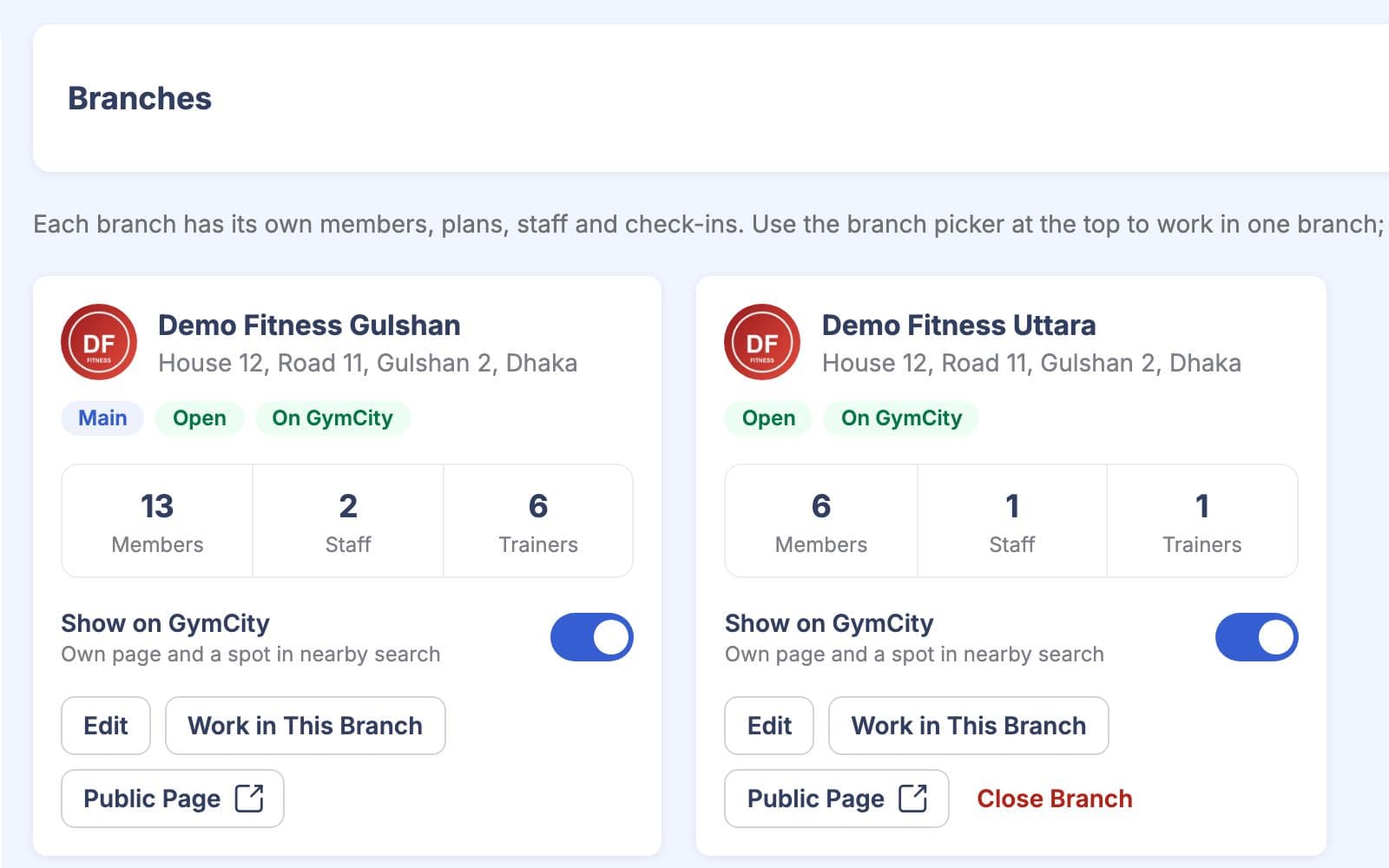
মাল্টি-ব্রাঞ্চ দিয়ে একাধিক লোকেশন থাকলে সবগুলো একটাই GymCity অ্যাকাউন্ট থেকে চালাতে পারবেন। মালিক সব ব্রাঞ্চ দেখতে পারবেন আর একটার থেকে আরেকটায় যেতে পারবেন। ম্যানেজার আর ফ্রন্ট ডেস্ক স্টাফ শুধু তাদের ব্রাঞ্চগুলোই দেখতে পারবেন।
GymCity মাল্টি-ব্রাঞ্চ কী?
GymCity মাল্টি-ব্রাঞ্চ দিয়ে একটা জিম একাধিক ব্রাঞ্চ এক অ্যাকাউন্ট থেকে চালাতে পারে। প্রতিটা ব্রাঞ্চের আলাদা ঠিকানা, ম্যাপে লোকেশন, খোলার সময় আর GymCity-তে আলাদা পাবলিক পেজ থাকবে। মালিক সব ব্রাঞ্চ দেখতে আর বদলাতে পারবেন, আর স্টাফ আর জিম ট্রেইনাররা শুধু তাদের ব্রাঞ্চগুলোই দেখতে পারবেন।
কেন জিমগুলো মাল্টি-ব্রাঞ্চ ব্যবহার করেন
আলাদা সিস্টেম
আমাদের দ্বিতীয় ব্রাঞ্চ আলাদা স্প্রেডশিটে চলে। মাস শেষে দুই সেট নাম্বার হাতে গুনে যোগ করি।
সব ব্রাঞ্চ একটাই জিম অ্যাকাউন্টে থাকে।স্টাফ সবকিছু দেখে
নতুন ব্রাঞ্চ ম্যানেজারকে লগইন দিলে, সে অন্য ব্রাঞ্চের মেম্বার আর পেমেন্টও দেখতে পারে।
স্টাফ শুধু তাদের ব্রাঞ্চগুলোই দেখতে পারে।সব ব্রাঞ্চের জন্য একটাই পেজ
অনলাইনে আমাদের একটাই লিস্টিং, একটাই ঠিকানা, তাই নতুন ব্রাঞ্চের আশেপাশের মানুষ জানেই না ওটা আছে।
প্রতিটা ব্রাঞ্চের আলাদা পেজ আর ম্যাপে পিন থাকে।3 ধাপ-এ মাল্টি-ব্রাঞ্চ
ব্রাঞ্চ যোগ করুন
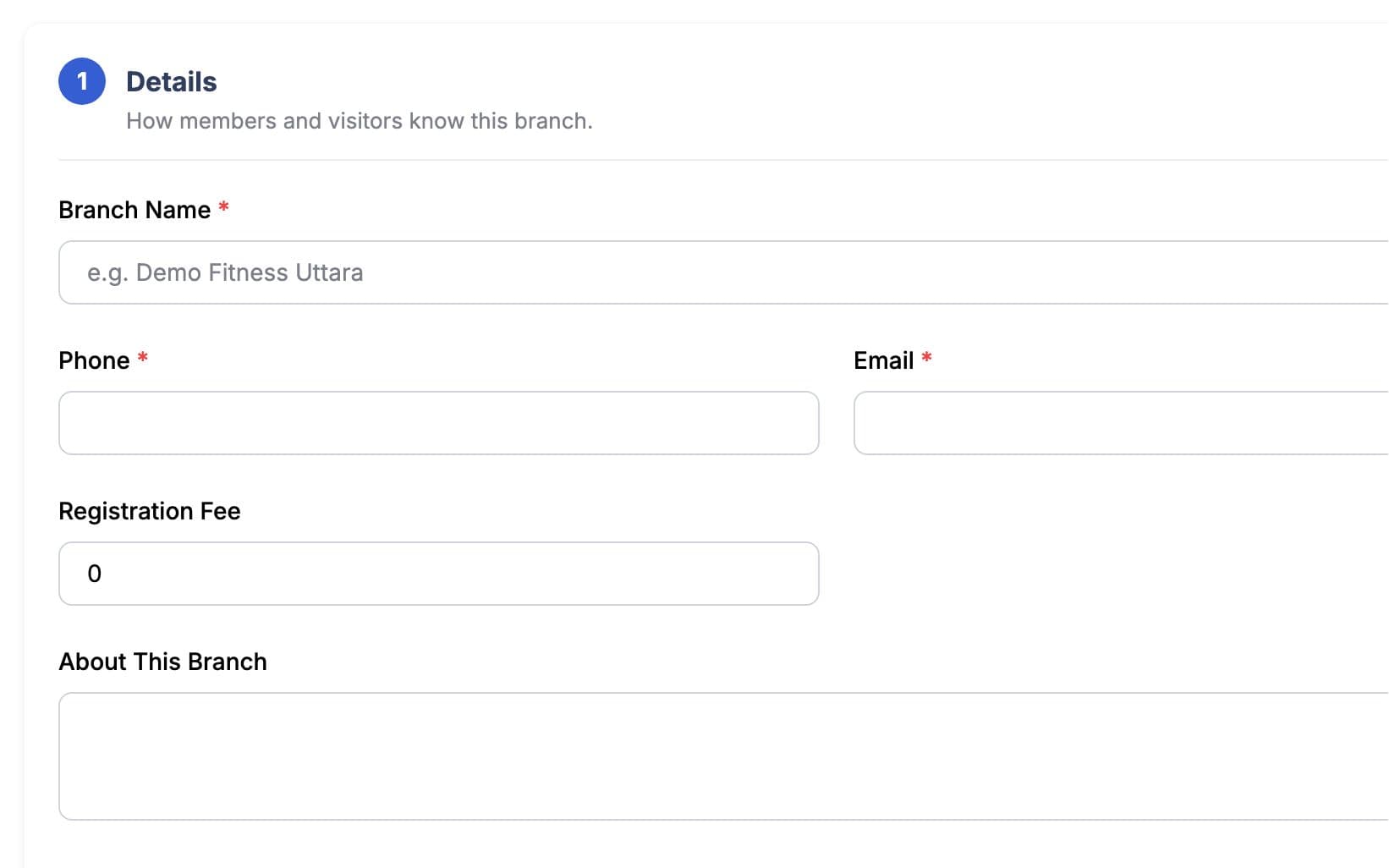
Gym Settings → Branches-এ গিয়ে ব্রাঞ্চের কন্টাক্ট ডিটেইলস, ঠিকানা আর ম্যাপ পয়েন্ট দিয়ে ব্রাঞ্চ যোগ করুন। GymCity মেইন ব্রাঞ্চের সেটিংস, পেমেন্ট ডিটেইলস আর খোলার সময় কপি করে দেয়, তাই শুধু যেটা আলাদা সেটা বদলান। নতুন ব্রাঞ্চ শুরুতে হিডেন থাকে, যাতে আপনি সেটআপ শেষ করতে পারেন। মেইন ব্রাঞ্চ ছাড়া বাড়তি ব্রাঞ্চ যোগ করা আপনার প্লানের ওপর নির্ভর করে।
পাবলিশ করুন
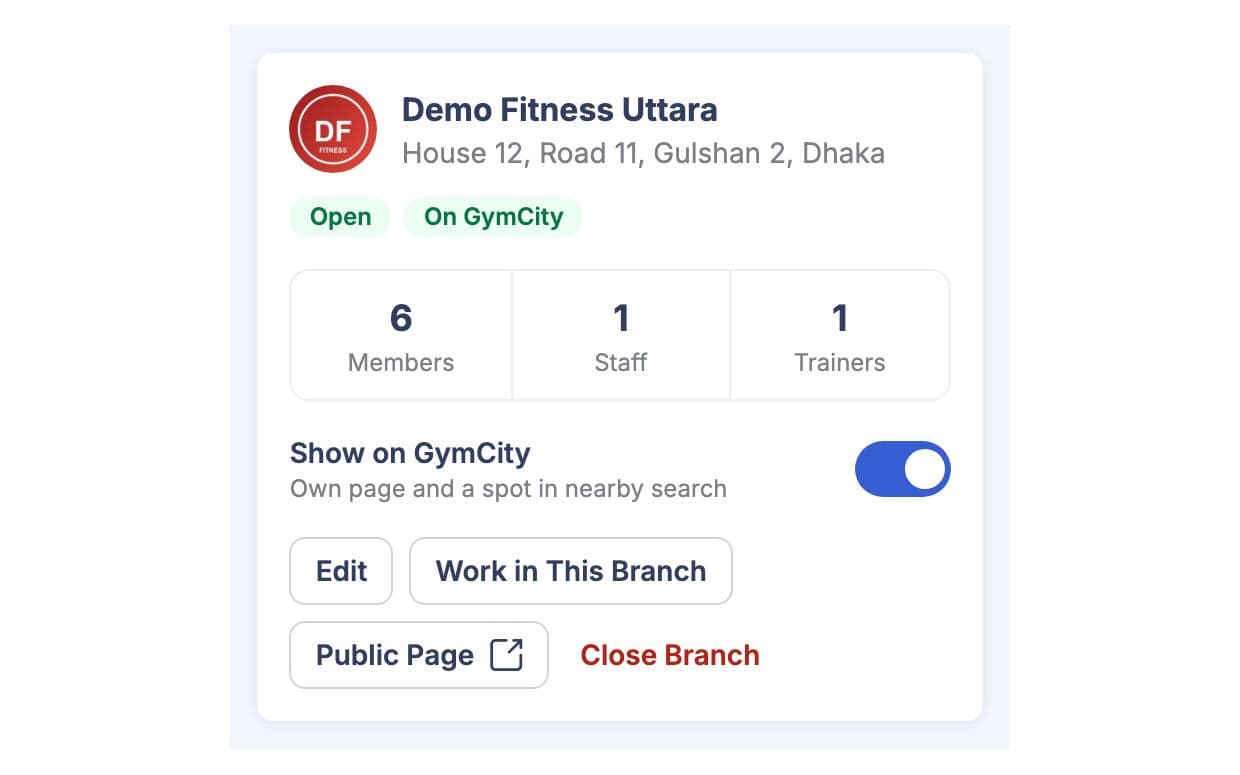
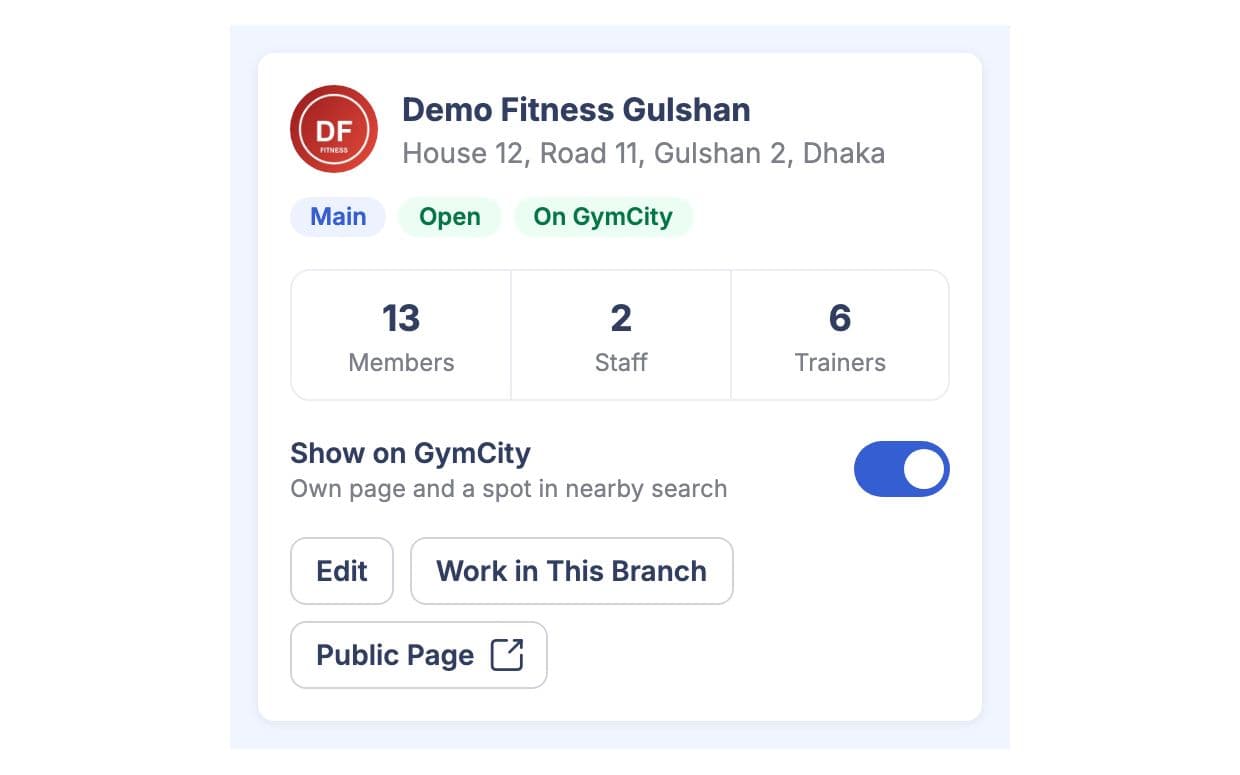
ব্রাঞ্চ রেডি হলে, Show on GymCity অন করুন। তখন ব্রাঞ্চের আলাদা পাবলিক পেজ আর জিম সার্চে আলাদা লিস্টিং হবে, ঠিকানা, সময় আর ম্যাপ পিনসহ। ওই পেজে আপনার অন্য পাবলিশড ব্রাঞ্চও দেখাবে। চাইলে আবার হাইড করতে পারবেন, আর ক্লোজড ব্রাঞ্চ কখনো দেখাবে না।
ব্রাঞ্চে কাজ করুন
হেডারের ব্রাঞ্চ পিকারে ব্রাঞ্চ সিলেক্ট করুন, তখন মেম্বার, অ্যাটেনডেন্স আর রিপোর্ট ওই ব্রাঞ্চ অনুযায়ী দেখাবে। মালিক সব ব্রাঞ্চে যেতে পারবেন; স্টাফ শুধু তাদের ব্রাঞ্চগুলোই দেখতে পারে। কোনো ব্রাঞ্চ বন্ধ হলে, Branches-এ গিয়ে ক্লোজ করুন, ডিলিট না করে, তাহলে হিস্টরি থাকবে। মেইন ব্রাঞ্চ ক্লোজ করা যাবে না।
আপনার কাজের ধরন মাথায় রেখে তৈরি
মালিক একটাই লগইন থেকে সব ব্রাঞ্চ দেখতে পারেন আর ব্রাঞ্চ পিকার দিয়ে বদলাতে পারেন।
প্রতিটা পাবলিশড ব্রাঞ্চ সার্চে আলাদা লিস্টিং হয়, তাই মানুষ তাদের কাছের লোকেশন খুঁজে পায়।
ম্যানেজার, ফ্রন্ট ডেস্ক স্টাফ আর জিম ট্রেইনাররা শুধু তাদের ব্রাঞ্চের মেম্বার আর রেকর্ড দেখতে পারে।
মাল্টি-ব্রাঞ্চ-এ যা পাচ্ছেন
মাল্টি-ব্রাঞ্চ: সচরাচর প্রশ্ন
জিম মালিক ও ট্রেইনাররা সবচেয়ে বেশি যা জিজ্ঞেস করেন, তার সংক্ষিপ্ত উত্তর।
সব প্রশ্ন →না। একটাই জিম অ্যাকাউন্টে আপনার সব ব্রাঞ্চ থাকবে, আর একটাই মালিকের লগইন লাগবে। প্রতিটা ব্রাঞ্চের আলাদা ঠিকানা, সময়সূচি, পাবলিক পেজ, স্টাফ আর মেম্বার থাকবে, আর আপনি সবকিছু ম্যানেজ করতে পারবেন Gym Settings → Branches থেকে। নতুন ব্রাঞ্চ খুললে সেটার সেটিংস মেইন ব্রাঞ্চ থেকে নেয়, তাই প্রথমবারের চেয়ে অনেক কম সময় লাগে।
না। স্টাফ আর জিম ট্রেইনাররা শুধু যেসব ব্রাঞ্চে অ্যাসাইন করা আছে সেগুলোই দেখতে পারে, আর GymCity এটা শুধু মেনুতে না, সার্ভারেও চেক করে। মালিক সব ব্রাঞ্চ দেখতে পারেন। যদি কোনো ম্যানেজার দুইটা ব্রাঞ্চ দেখাশোনা করেন, তাহলে তাকে দুইটাতেই অ্যাসাইন করুন, আর সে ব্রাঞ্চ পিকার দিয়ে সহজেই ব্রাঞ্চ বদলাতে পারবে।
হ্যাঁ, যখন আপনি ওই ব্রাঞ্চের জন্য Show on GymCity চালু করেন তখনই পাবেন। নতুন ব্রাঞ্চ শুরুতে লুকানো থাকে, তাই আপনি রেডি না হওয়া পর্যন্ত কিছুই পাবলিক হয় না। প্রতিটা পাবলিশ করা ব্রাঞ্চের আলাদা পেজ আর সার্চ লিস্টিং থাকে, যেখানে ঠিকানা, সময় আর ম্যাপে লোকেশন দেখায়, আর ওই পেজ থেকে আপনার অন্য পাবলিশ করা ব্রাঞ্চগুলোর লিংকও থাকে।
হ্যাঁ। কোনো ব্রাঞ্চ বন্ধ করলে সেটা GymCity-তে আর দেখা যাবে না, কিন্তু সব রেকর্ড যেমন পুরনো মেম্বার, পেমেন্ট আর ভিজিট ঠিকই থাকবে। চাইলে পরে আবার একই Branches স্ক্রিন থেকে খুলে দিতে পারবেন। মেইন ব্রাঞ্চ বন্ধ করা যাবে না, কারণ নতুন ব্রাঞ্চ খুললে সেখান থেকে সেটিংস কপি হয়।
না। আপনার মেইন ব্রাঞ্চ সবসময়ই থাকবে, কিন্তু আরও ব্রাঞ্চ যোগ করতে হলে মাল্টিপল ব্রাঞ্চেস অপশনসহ প্ল্যান নিতে হবে। কোন প্ল্যানে এটা আছে, সেটা প্রাইসিং পেজে দেখা যাবে। মাল্টি-ব্রাঞ্চ মূলত এক জিমের একাধিক লোকেশনের জন্য; আলাদা মালিকের আলাদা বিজনেস হলে, প্রত্যেকের আলাদা GymCity অ্যাকাউন্ট থাকা উচিত।
একসাথে আরও ভালো কাজ করে
সর্বশেষ আপডেট 16 অক্টোবর, 2026লিখেছেন Sarwar Hossainস্ক্রিনে শুধু ডেমো তথ্য দেখানো হয়েছে
আপনার জিমে মাল্টি-ব্রাঞ্চ ট্রাই করুন
আজই ফ্রিতে আপনার জিম লিস্ট করুন, আর প্রস্তুত হলে প্রয়োজনীয় টুলগুলো চালু করুন।